
Demand meters capture two distinct reads each billing cycle:
- A standard (basic) consumption read: calculated as present minus previous reading.
- A demand peak read: present reading only, the demand meter resets each billing period, so no previous read is used.
Both reads are run through their own rate tiers separately, and the resulting charges are separated on the invoice, even though its the same meter.
Rate Table Configuration
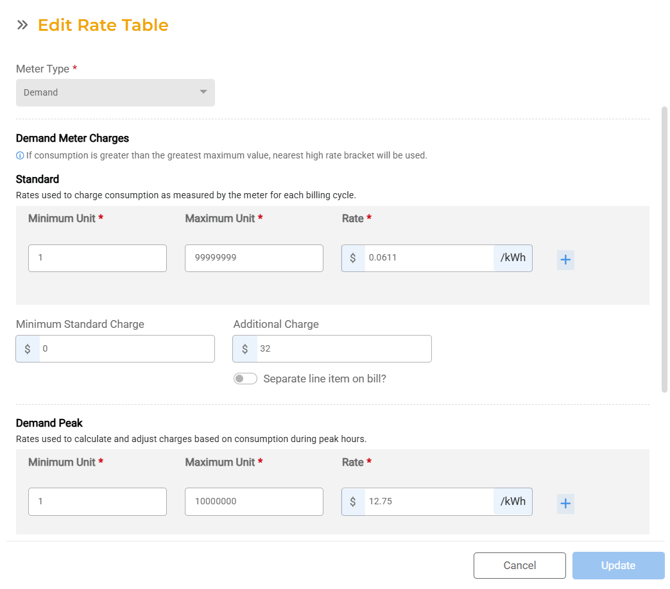
When creating a rate table and selecting "Demand" as the meter type, the form displays demand-specific fields. The following sections describe what can be configured.
Standard Charges
Consumption charges based on the standard (basic) read.
- At least one tier is required
- Each tier requires: Minimum Units (whole number), Maximum Units (whole number), Rate per unit (decimal, max 5 digits before decimal, 2 after)
- Tiers must be incremental: each new tier's minimum is auto-populated from the previous tier's maximum; no two tiers can overlap
- Minimum Standard Charge: optional; if the calculated charge falls below this amount, this value is used instead
- Additional Standard Charge: optional flat charge added on top of consumption; can be configured to print as a separate line item on the bill
Peak Charges
Consumption charges based on the demand peak read.
- At least one tier is required
- Each tier requires: Minimum Units (whole number), Maximum Units (whole number), Rate per unit (decimal, max 5 digits before decimal, 2 after)
- Same incremental tier rules apply: no overlapping ranges
- Minimum Peak Charge: optional
- Additional Peak Charge: optional, with separate line item display option
Demand Ratchet (Optional)
The Demand Ratchet is an optional billing rule. When enabled via a toggle, two fields appear:
- Period: the number of months of historical peak data to look back (whole numbers only, up to 2 digits, e.g. 12 or 24 months)
- Percentage: the percentage of the historical peak demand used as a floor for the current period's demand charge (decimal input, max 99.99%, max 2 decimal places)
Calculation: the system compares the current period's peak demand read against the highest peak from the prior N months multiplied by the ratchet percentage. The greater of the two values is used for the demand charge.
Example: If the peak rate is 0.10, and the highest peak in the last 11 months was 1,000 units at 80% ratchet (floor = 800), and the current peak read is 750: the system uses 800 x 0.10 = $80.00 for the demand charge.

Field Validations
- Rate table name: 1 to 100 characters, alphanumeric with special characters allowed
- Demand Ratchet period: whole numbers only, up to 2 digits
- Demand Ratchet percentage: decimal up to 99.99%, max 2 decimal places
- Standard and peak tier units: whole numbers only
- Standard and peak tier rates: decimal, max 5 digits before decimal, 2 after
- Minimum and additional charges: decimal, max 5 digits before decimal, 2 after
- Tier ranges cannot overlap: the system enforces this with validation
Billing Engine: How Demand Charges Are Calculated
The billing engine calculates demand meter charges as follows:
- Standard consumption: (Present reading - Previous reading) x Multiplier
- Demand consumption: Present Demand Peak reading × Multiplier (no previous read used; meter resets each period)
- Demand reads can have their own multiplier under Operations > Assets > Meters > Demand Meters have a field for Demand multiplier, if its empty it used the basic read multiplier
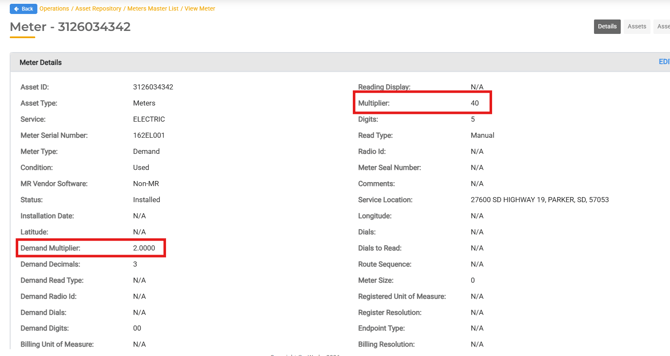
- Demand reads can have their own multiplier under Operations > Assets > Meters > Demand Meters have a field for Demand multiplier, if its empty it used the basic read multiplier
- Each consumption value is run through its respective rate tier independently
- If Demand Ratchet is enabled: the system compares the current peak against the historical high (N months x percentage) and uses the greater value for the demand charge
- 'DR' us used to indicate which read is for demand in the billing run

Meter Reads and MR File Support
The system supports capturing and processing dual reads for demand meters.
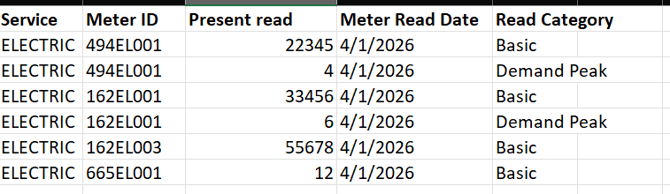
- Meter Usage records include both Demand Reading (peak) and Basic Reading (standard) fields - there will be two reads on the download and upload file - one for Basic and one for Peak.
- Note: This will look a little different for each vendor and file type
Mid-Period Meter Change-Outs
When a meter is replaced during a billing period, the billing engine:
- Captures reads from both the old and new meter
- Combines consumption from both to calculate the total for the period
- Ensures no consumption goes uncharged due to a mid-period change-out
Invoice and Bill Display
- Standard and peak charges appear as line items on the invoice
- If Additional Charges are configured with the separate line item option enabled, they print as distinct line items
- If the separate line item option is off, additional charges are included within the consolidated charge line